
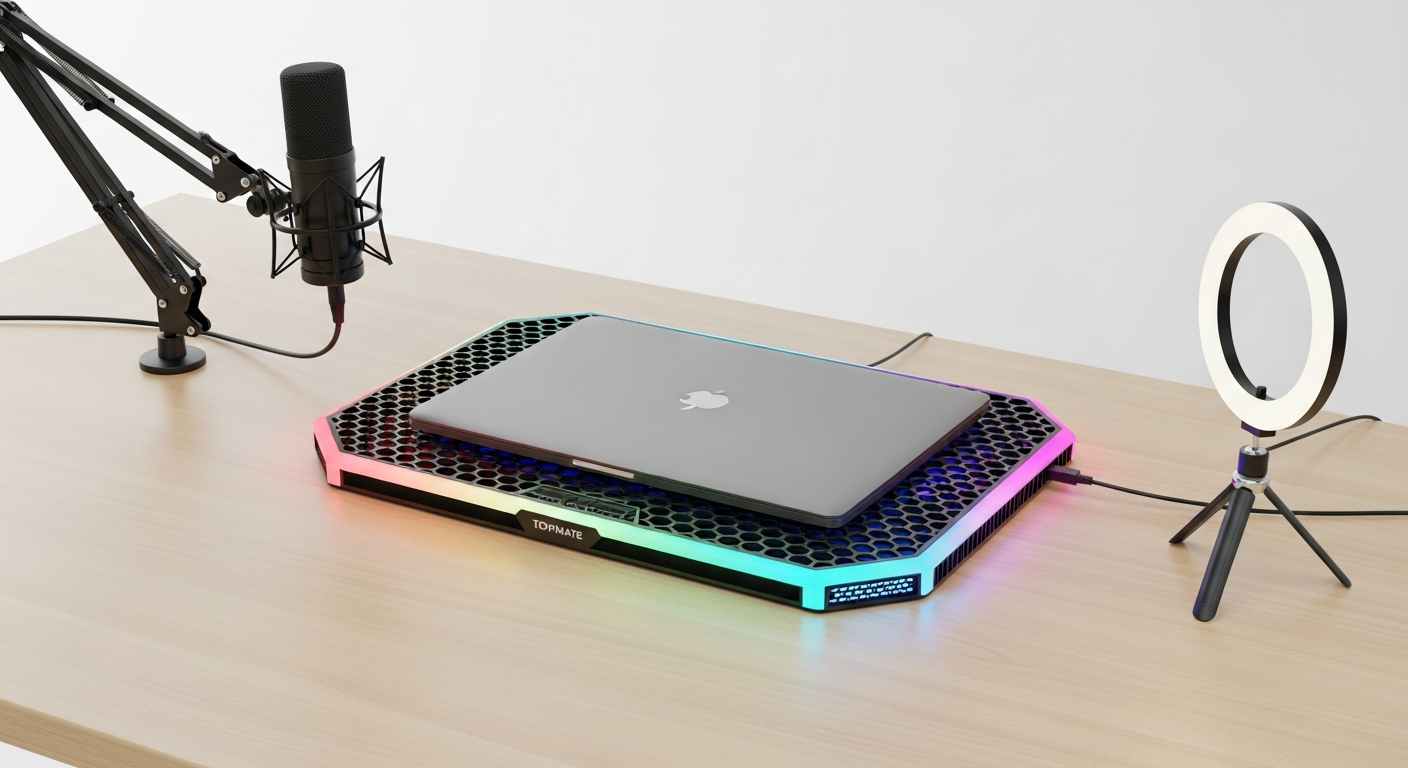
Discover how the Topmate C11 RGB laptop cooler keeps your creative workstation cool and productive. Explore thermal management, ergonomic design, and multitasking features for video editors, designers, and streamers. Get the complete breakdown.
If your laptop throttles during a rendering session, you're watching time slip away. That spinning wheel represents money lost, deadlines missed, and creative momentum killed. Content creators working with 4K video, 3D animation, or live streaming setups face brutal thermal demands that generic cooling solutions simply can't handle. Your machine needs serious heat management, not marketing hype.
Most cooling pads on the market target gamers, leaving professional creators to piece together solutions from gaming-focused products that don't quite fit their workflow needs. You need something that handles sustained workloads during 8-hour editing marathons, maintains whisper-quiet operation for voiceover recording, and actually improves your workspace rather than cluttering it. The Topmate C11 RGB Laptop Cooler has earned its reputation as a best-seller by addressing exactly these demands—offering powerful thermal management without sacrificing the ergonomic and aesthetic considerations that matter to professionals.
Discover how the Topmate C11 can transform your creative workspace today.
This guide examines the C11 through the lens of serious content professionals, evaluating its six-fan cooling architecture during sustained rendering tasks, analyzing why adjustable height settings become essential during extended creative sessions, and exploring how the integrated phone holder turns your setup into a multitasking command center that keeps reference materials and client communications within reach.
Thermal Management for Sustained Creative Workloads
Your CPU doesn't care whether you're gaming or rendering a 4K timeline—it generates the same heat either way, and that's where the C11's engineering shines. The cooler features six strategically positioned fans: four compact units paired with two larger fans that work in concert to generate sustained airflow across your laptop's thermal zones. This architecture prevents hot spots and maintains even temperature distribution rather than just blasting air at one location.
The metal mesh plate separates the C11 from cheaper alternatives using solid plastic surfaces. Metal conducts heat away from your laptop far more effectively, which becomes critical during marathon editing sessions where thermal consistency directly impacts your creative output. When your machine maintains stable temperatures, throttling stops, performance remains predictable, and your workflow continues uninterrupted.
Power flexibility matters more than specifications suggest. Standard USB 5V operation provides solid cooling during typical creative work, but the optional 8V mode engages when you're pushing maximum performance during CPU-intensive video exports or 3D rendering cycles. This dual-mode approach lets you choose between standard operation and sustained high-performance cooling without burning through extra power.
The capacitor-equipped fans operate at noise levels that won't sabotage your audio work. When you're recording voiceovers, podcasts, or capturing dialogue during video production, fan noise becomes a productivity assassin that compromises your final output. The C11's quiet operation means you can record directly into your primary machine without fighting background noise in post-production.
Fan placement strategy prevents the common problem of pushing dust directly into your laptop's intake vents. Proper airflow management requires thoughtful positioning that dissipates heat without creating debris circulation patterns that damage your equipment over time.
Ergonomic Setup for Extended Creative Sessions
Eight hours hunched over your keyboard transforms into physical suffering by hour six. The C11's five to six adjustable height settings address this reality by letting you customize screen elevation to match your actual desk setup and body mechanics. You're not just propping up a laptop—you're designing an ergonomic workstation that prevents the neck and back fatigue that derails creative focus.
Typing angle optimization positions your keyboard for comfortable script writing, caption creation, and the constant communication that modern creative work demands. Whether you're messaging clients, reviewing feedback, or writing copy, proper keyboard positioning prevents wrist strain that accumulates across weeks of intensive work. This matters more than it sounds because physical discomfort directly interrupts creative flow.
The compact footprint integrates into cramped creative workspaces without consuming valuable desk real estate. Your creative studio probably already struggles with space—graphics tablet, monitor arm, lighting setup, audio interface—so a cooling solution that actually saves space rather than consuming it becomes genuinely useful. The C11's proportions leave room for the other equipment that defines your professional setup.
Stability across all height positions means your laptop doesn't shift or wobble as you adjust elevation settings. This might seem obvious, but inadequate stability breaks concentration during detailed color grading or precision editing work where screen movement becomes noticeable and distracting.
Multitasking Features That Enhance Creative Workflow
The integrated phone holder stored on the left side transforms your setup from a single-purpose editing station into a true multitasking command center. Reference images, client feedback, social media content, and real-time messaging all live within arm's reach without forcing you to shift your focus away from your primary creative work. This seems like a minor convenience until you realize how often creative work requires simultaneous access to multiple information sources.
Smartphone placement keeps video call monitoring accessible during collaborative sessions without requiring a separate device stand that consumes more desk space. When you're working with clients, creative directors, or team members, maintaining visual connection matters more than you'd expect for building creative rapport and catching real-time feedback nuances that text-based communication misses.
The dual USB ports eliminate the need for external hubs by providing direct connectivity for external storage drives, graphics tablets, and audio interfaces. This streamlines your workspace by reducing cable clutter while ensuring reliable connections for the peripherals that define your creative toolkit.
Mobile device compatibility accommodates various phone sizes and weights, which matters more than manufacturers typically acknowledge. Your phone holder needs to securely grip everything from compact devices to larger phones with protective cases without wobbling or dropping under the slightest movement.
Experience the complete creative workflow enhancement that the Topmate C11 delivers.
RGB Lighting in Professional Creative Environments
Seven customizable lighting modes range from color breathing and monochrome options to static illumination, giving you flexibility that extends beyond pure aesthetics. The extended RGB bars on both sides provide ambient lighting that complements your creative space without overwhelming your setup. Unlike single-strip designs, dual-side lighting creates balanced illumination that enhances focus during extended creative sessions.
The ability to disable RGB features entirely addresses a legitimate concern for color-critical work. Photo editors and color graders need neutral lighting environments, not distracting color shows that compromise visual accuracy. The C11 acknowledges this reality by letting professionals toggle lighting based on their specific creative task rather than forcing constant RGB operation.
Stream and content creators benefit differently—RGB lighting in background shots enhances the visual appeal of your setup during video presentations, tutorials, and live streaming sessions. The customizable modes let you match your lighting to your creative brand's color palette, creating visual consistency across your content ecosystem.
The RGB operation draws minimal power that doesn't impact your laptop's battery life or the cooling system's performance. Low-power LED implementation means you're not sacrificing thermal efficiency or drawing significant current from your system.
Build Quality and Durability for Professional Use
Thermosetting plastic construction withstands daily professional use and the constant transport that freelance creators endure when moving between offices, coffee shops, and co-working spaces. This isn't boutique industrial equipment—it's durable consumer-grade engineering designed to survive real-world creative workflows where equipment gets handled, adjusted, and moved repeatedly.
The metal mesh plate advantage offers superior durability compared to plastic alternatives, with better heat conductivity that improves thermal performance while lasting longer under demanding conditions. This material combination creates a cooling pad that improves your equipment's longevity rather than adding temporary thermal relief.
Reinforced USB ports feature heavy-duty connectivity that handles frequent plugging and unplugging of peripherals without degrading connection quality. Weak USB ports plague cheaper cooling pads, forcing you to restart connections or deal with intermittent device recognition that ruins workflow efficiency.
Long-term reliability maintains consistent performance across months of intensive creative workloads. This isn't equipment that fails after three months of heavy use—it's built to support sustained professional demands across extended timelines.
Portability for remote creators means the lightweight design actually travels without adding significant weight to your equipment bag. When you're moving between client offices and your home studio multiple times weekly, every pound matters.
Dust accumulation requires realistic maintenance expectations. The C11's fan system needs periodic cleaning to maintain peak performance, but the design makes access and maintenance straightforward for users willing to dedicate occasional attention to equipment upkeep.
Real-World Performance Scenarios for Content Professionals
Video editing with 4K footage demonstrates thermal behavior during timeline scrubbing and effects rendering where CPU demand spikes unpredictably. The C11 maintains consistent temperatures through these demanding moments when other cooling solutions might falter or create throttling bottlenecks that interrupt your editing rhythm.
Live streaming setup requires sustained cooling while simultaneously running OBS, chat monitoring, and media servers—exactly the multitasking scenario where thermal management separates amateur setups from professional broadcasts. Thermal throttling during a live stream isn't just an annoyance; it's a technical failure visible to your audience.
Graphic design and photo editing prevent thermal throttling during color grading and batch processing where sustained CPU and GPU load generates consistent high heat. Color accuracy requires stable machine performance, which demands reliable thermal management throughout extended sessions.
Audio production requires quiet operation essential for recording voiceovers and podcast content without fan noise contaminating your final audio. This is where the C11's capacitor-equipped fans provide measurable value beyond general cooling specs.
3D modeling and animation sustains cooling during viewport navigation and render preview cycles where GPU demand spikes dramatically. The six-fan system handles these demanding scenarios without the thermal instability that forces render restarts or creative compromise.
Web development keeps temperatures stable while running local servers, databases, and multiple browser tabs simultaneously. The multitasking demands of modern development work generate sustained heat that requires reliable thermal management.
Addressing Common Concerns for Serious Users
Phone holder stability requires securing larger devices and preventing wobbling during multitasking scenarios. Some users report the phone holder might not accommodate all phone sizes equally, so verify compatibility with your specific device before assuming universal fit.
Stand stability on uneven surfaces ensures the adjustable legs remain locked at your preferred height throughout your creative session. Occasional reports suggest the stand might shift on certain desk surfaces, so testing stability with your particular setup confirms reliable performance before relying on it for mission-critical work.
Dust management and fan direction is a legitimate consideration. The fan positioning should prevent debris from being pushed directly into your laptop's intake vents, but monitor dust accumulation patterns to ensure proper airflow behavior matches your specific environment.
RGB distraction during focused work requires toggling lighting on and off based on your creative task. Color-critical work often benefits from neutral lighting environments, and the C11 accommodates this need rather than forcing constant RGB operation.
Optimal elevation requirements clarify that the C11 performs best when elevated sufficiently to allow unobstructed airflow beneath your laptop. Minimal elevation reduces cooling effectiveness, so ensure your desk space accommodates proper positioning for maximum performance.
Compatibility with laptop sizes confirms the 11 to 17.3-inch range covers most contemporary devices, but verify your specific machine dimensions before purchasing to ensure proper fit and cooling contact.
Heat dissipation limitations acknowledge that external cooling reaches its ceiling with extremely demanding workloads. The C11 provides significant thermal relief, but it can't compensate for fundamentally inadequate laptop cooling systems under absolute maximum stress conditions.
Value Proposition for Budget-Conscious Creators
The $20-$40 price range positions the C11 competitively against both premium cooling solutions and gaming-focused alternatives that deliver less relevant features for professional creative work. This affordability makes serious cooling accessible without requiring the budget commitment that professional-grade equipment typically demands.
Feature-to-cost ratio evaluation reveals whether the C11 delivers better value than single-fan basic cooling pads or premium solutions with excessive gaming-focused features you'll never use. The comprehensive feature set—six fans, adjustable height, RGB lighting, phone holder, dual USB ports—delivers remarkable value at this price point.
Long-term investment calculation shows ROI through improved laptop longevity and sustained performance across years of intensive creative work. Equipment that prevents thermal throttling extends your machine's functional lifespan while maintaining consistent performance that improves your creative output quality.
Comparison with professional cooling systems reveals where the C11 fits in the broader market. It doesn't replace enterprise-grade solutions for absolute maximum performance, but it delivers professional-quality thermal management at consumer-friendly pricing that actual freelancers and small creative studios can actually afford.
Affordability without compromise delivers professional-grade cooling at consumer pricing without forcing you to choose between financial responsibility and equipment quality. This is equipment that takes your creative ambitions seriously without demanding premium pricing that strains your business finances.
Accessibility for freelancers provides a budget-friendly solution for independent creators managing equipment costs where every dollar allocated to tools directly impacts profitability. The C11 becomes a worthwhile investment that improves your working conditions while maintaining healthy business economics.
Beyond the Specs: Making Your Creative Setup Work Harder
The Topmate C11 RGB Laptop Cooler transforms from a simple cooling accessory into a legitimate productivity multiplier when you understand how each feature serves your creative workflow. The six-fan system keeps your machine cool during brutal rendering marathons, the adjustable height eliminates neck strain during 10-hour editing sessions, and the integrated phone holder keeps reference materials and client messages within arm's reach. What makes the C11 genuinely compelling for content creators is its honest approach to thermal management—delivering consistent, reliable heat dissipation at a price point that won't drain your equipment budget.
The quiet operation matters more than you'd think when recording voiceovers or live streaming, as fan noise is a silent productivity assassin that audiences notice immediately. Your creative work deserves equipment that keeps up with your ambitions, and the Topmate C11 does exactly that without pretension, without breaking the bank, and without cluttering your workspace.
Invest in the Topmate C11 RGB Laptop Cooler and reclaim control of your creative workflow today.