
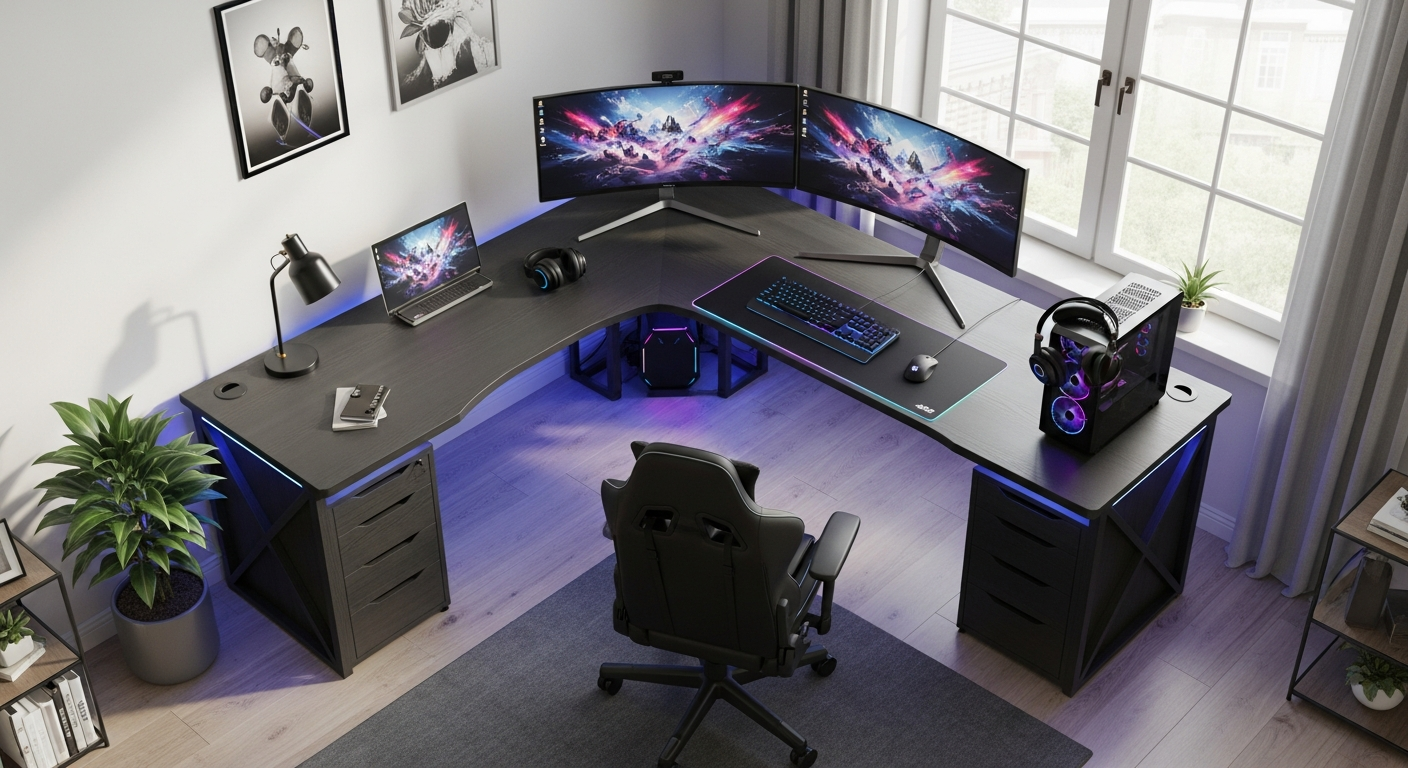
Master the setup and configuration of your Sikaic L-Shaped Reversible LED Gaming Desk. Learn assembly tips, LED customization, and space optimization strategies for gamers and remote workers.
Gamers and remote workers spend an average of 8-10 hours daily at their desks—yet most people settle for subpar setups that drain productivity and kill their vibe. The workspace you choose directly impacts your performance, comfort, and how much you actually enjoy your time there. When you're staring at a cramped, poorly lit surface for the majority of your day, even the best gaming rig or work ethic can't compensate for that fundamental discomfort.
The Sikaic L-Shaped Reversible LED Gaming Desk has earned its reputation as a bestseller by solving a real problem: how to create a professional, immersive workspace without breaking the bank. This desk combines thoughtful design with accessible pricing, making it a legitimate contender for anyone serious about upgrading their setup. With its adaptable configuration, integrated LED lighting, and generous surface area, you get functionality that rivals desks costing twice as much.
Understanding Your Sikaic L-Shaped Reversible LED Gaming Desk Configuration Options
The reversible design isn't just marketing speak—it's a practical feature that gives you genuine control over how your desk fits into your room. This flexibility means you're not locked into one specific orientation the moment assembly ends. Instead, you can adapt the desk to match your room's architecture, natural light patterns, and personal workflow preferences.
What Reversible Means and How It Impacts Your Room Layout Flexibility
Reversibility refers to the ability to flip the L-shaped configuration so the longer extension can be positioned on either the left or right side. This seemingly simple feature unlocks significant spatial advantages. In a corner office, you might place the extension toward the window to maximize natural light on your gaming monitors. In a bedroom setup, reversing the configuration could position your keyboard tray closer to your main seating area while keeping cables away from high-traffic zones.
Left-Corner Versus Right-Corner Configurations Explained
The left-corner configuration places the longer arm on your left side, ideal if you're right-handed and prefer your primary monitor directly in front of you with gaming peripherals clustered to the right. The right-corner configuration mirrors this setup, benefiting left-handed users or anyone whose room layout demands the extension point rightward. Your monitor placement, keyboard positioning, and mouse pad location should all align with your dominant hand and natural reaching patterns.
Measuring Your Space Before Assembly to Avoid Costly Mistakes
Before you open a single box, measure your available space carefully. Account for the full L-shaped footprint—many people underestimate how much floor space the longer arm requires. Measure from your intended corner outward in both directions, noting any obstacles like radiators, outlets, or doorway swings. A desk that's one inch too long for your corner becomes a source of daily frustration, so precision matters here.
Identifying Which Configuration Maximizes Your Natural Lighting and Monitor Placement
Natural light dramatically affects both your mood and screen visibility. Position your desk so that windows are to your side rather than directly behind your monitors, which creates glare, or facing the monitors, which causes eye strain. The reversible design lets you test both configurations mentally before assembly. If your room's best natural light comes from the left, orient your longer desk arm to complement that direction rather than fight it.
How the L-Shape Design Accommodates Multi-Monitor Setups, Peripherals, and Personal Items
The L-shaped surface provides distinct zones for different functions. Your primary monitor occupies the main section directly in front of you, while secondary monitors, streaming setups, or work-related materials can spread across the longer arm without creating visual chaos. This segmentation keeps your gaming peripherals separated from your work documents, reducing cognitive load and making it easier to shift between different tasks throughout your day.
Step-by-Step Assembly Guide for Your Gaming Desk Setup
Assembly intimidates many people, but breaking the process into manageable chunks transforms it from a daunting marathon into a series of straightforward tasks. The Sikaic desk involves multiple parts, but clear organization and a methodical approach eliminate most frustrations.
Pre-Assembly Preparation: Organizing Parts, Tools Needed, and Workspace Requirements
Before touching any screws, lay out all components in your assembly area. Sort hardware by size and type into separate containers—mixing bolts and screws guarantees you'll grab the wrong fastener at a critical moment. Check the parts list against what arrived; missing components should be addressed immediately rather than discovered mid-assembly. Gather a power drill, screwdriver set, level, and measuring tape. Clear enough floor space to work comfortably—you'll need room to position large frame sections as you build.
Breaking Down the Assembly Into Manageable Phases to Reduce Frustration
Divide assembly into distinct phases: frame construction, support leg installation, horizontal surface attachment, and finishing touches. Completing one phase before moving to the next creates natural checkpoints where you can assess progress and catch mistakes early. This approach prevents the common scenario where you realize halfway through that you've installed something backward or omitted a crucial step.
Detailed Instructions for Constructing the Main Frame and Support Structure
Start by assembling the main rectangular frame using the longer side panels, shorter connecting pieces, and corner brackets. Use your power drill for speed, but hand-tighten final connections so you don't strip the pre-drilled holes. Position the frame on a flat surface and verify it's square by measuring diagonal corners—they should be equal. Next, attach the support legs at designated mounting points, ensuring they're perfectly vertical using your level. Wobbly desks almost always result from skipped diagonal measurements at this stage, so invest time in getting this right.
Integrating and Customizing Your LED Lighting System
The LED lighting transforms your desk from functional furniture into an immersive environment that signals to your brain that you're entering focus mode. Most Sikaic models include RGB lighting capable of producing thousands of color combinations, though some versions feature single-color ambient lighting instead.
Types of LED Lighting Included With Your Sikaic Desk
RGB LED strips typically run along the underside of the desktop surface, creating backlighting that reflects off your wall and monitor stands. This indirect lighting reduces eye strain compared to direct desk lamps while adding visual appeal. Some models include ambient-only variants that emit a single warm or cool tone, perfect if you prefer simplicity over customization. Identify which type your model includes by consulting the manual—this determines how extensively you can personalize your lighting experience.
Powering Your LED Lights Safely Without Creating Cable Clutter
The LED control box requires a USB connection or standard power outlet. Route this cable along your cable management system rather than letting it dangle visibly. Most Sikaic desks include a power outlet slot or adhesive clips to secure the cable beneath the desktop. Keep the control remote or app interface within arm's reach of your primary seating position—you'll want instant access to adjust lighting during gaming or work sessions.
Adjusting Brightness Levels for Gaming Versus Work Modes
Intense gaming demands vibrant, energetic lighting that matches the onscreen action. Work-mode lighting should be softer and less distracting, allowing your eyes to rest while still providing ambient illumination. Create two distinct lighting profiles: one with maximum brightness and saturated colors for gaming, another with reduced intensity and cooler tones for focused work. Switching between these profiles takes seconds and noticeably affects your mental state and concentration.
Color-Changing Features and How to Program Custom Lighting Profiles
Most RGB systems include preset modes like rainbow cycles, static colors, and reactive lighting that pulses with audio. Beyond presets, you can often program custom profiles using included controls. Pair your favorite games with matching lighting—bright reds and oranges for action games, cooler blues for competitive shooters, warm whites for productivity work. Many users find that environmental consistency between their game's aesthetic and their desk's lighting deepens immersion and makes extended play sessions more enjoyable.
Optimizing Desk Space and Cable Management Strategies
A cluttered desk creates mental clutter. Strategic organization of your workspace multiplies the practical value of your Sikaic desk's generous surface area.
Creating Designated Zones for Gaming Peripherals, Work Materials, and Personal Items
Reserve specific areas for distinct purposes. Your gaming zone might occupy the right side of the main surface, holding your mouse pad, controller stand, and headphone rest. Your work zone takes the left side, designated for documents, notebooks, or a secondary keyboard. Personal items—photos, plants, collectibles—occupy carefully selected spots that don't interfere with either function. This zoning prevents that chaotic feeling where everything blends together and nothing feels intentional.
Vertical Storage Solutions Using Wall-Mounted Shelves Above Your Desk
Vertical space is underutilized in most setups. Wall-mounted shelves directly above your desk expand storage without consuming precious desktop real estate. These shelves hold frequently accessed items—game cases, reference books, streaming equipment—while keeping them within view but not in the way. The psychological benefit of seeing organized shelves above your workspace contributes to focus and reduces decision fatigue about where things belong.
Under-Desk Cable Routing Systems to Maintain a Clean Aesthetic
Cable chaos destroys the visual appeal of an otherwise excellent setup. Adhesive cable clips, cable sleeves, or fabric cord management systems route all power and data cables neatly along the underside of your desktop. Establish a plan before plugging anything in: decide which cables go where, group related connections together, and secure them at regular intervals. A clean cable situation takes thirty minutes to set up but saves countless hours of frustration when you need to adjust something later.
Maintenance and Longevity Tips for Your Sikaic Desk
Your desk is an investment that pays returns through years of reliable service. Basic maintenance prevents degradation and keeps everything functioning beautifully.
Routine Cleaning Schedules for Engineered Wood Surfaces
Weekly light cleaning with a microfiber cloth removes dust and keeps the surface looking sharp. Monthly deep cleaning using engineered wood-specific products removes buildup and restores luster. Avoid harsh chemicals or excessive moisture, which can damage the finish or cause swelling. Simple habits—wiping spills immediately, using coasters for beverages, keeping hot items away from the surface—prevent permanent damage.
Protecting Your Desk From Spills, Scratches, and Heat Damage
Engineered wood is durable but not indestructible. Use desk pads or mouse mats to protect high-traffic areas from scratches. Keep hot objects like cooking plates or room heaters away from the desktop to prevent warping. For beverage protection, maintain a strict coaster policy—water rings and stains become visible quickly on engineered wood finishes and are nearly impossible to remove completely.
Checking Structural Integrity and Tightening Bolts Periodically
Every three months, go through your desk with a wrench or screwdriver and tighten all bolts, screws, and fasteners. Daily use creates tiny vibrations that gradually loosen connections. Catching this early prevents wobbly surfaces that develop into serious structural issues. Pay particular attention to leg connections and any joints where the L-shape meets, as these experience the most stress.
Troubleshooting Common Issues and Solutions
Even with proper assembly and maintenance, occasional issues emerge. Most resolve quickly when you know what to look for.
Wobbly Desk Surface: Identifying Loose Components and Stabilization Techniques
Wobbling almost always indicates loose fasteners or uneven leg leveling. First, systematically tighten every bolt and screw. If wobbling persists, check that all four legs contact your floor evenly using a level. Hardwood floors sometimes have minor high and low spots; shim your desk legs with thin plastic or rubber shims until the surface is perfectly stable. Once stabilized, your desk will feel substantially more solid and professional.
LED Lights Not Turning On or Responding to Controls
Start by checking that the power connection is secure and that your wall outlet actually has power. Reset the LED control box by disconnecting and reconnecting its power source. If individual LED strips aren't illuminating, the connection between strips might be loose. Verify all adhesive connections and reseating connections if they're plug-based. If an entire LED section fails, the strip itself may be defective and require replacement—contact the manufacturer with your purchase date.
Uneven Leg Leveling and Floor Surface Compensation Methods
Not all floors are perfectly flat. Hardwood, tile, and carpet can all create slight deviations that make your desk uneven. Use a quality level to identify which legs need adjustment. Furniture shims are inexpensive and effective—slide them under legs until your level shows perfect horizontal alignment. Some prefer adjustable desk feet, which offer more flexibility and look cleaner than shims, though they cost more and require special installation.
Your Sikaic Desk Awaits: Transform Your Space Into a High-Performance Hub
Setting up your Sikaic L-Shaped Reversible LED Gaming Desk properly transforms it from simple furniture into a cornerstone of your productivity and gaming experience. The reversible configuration, integrated LED lighting, and expansive work surface represent genuine value when you've optimized every aspect of the setup. Whether you're a competitive gamer, content creator, or remote professional, the Sikaic desk accommodates your ambitions with engineered wood construction and an immersive LED lighting system.
Your investment in a quality gaming desk pays dividends through countless hours of comfortable, distraction-free work and play. The foundation matters—assembly done correctly ensures years of reliable service. The configuration you choose shapes how naturally your workflow unfolds. The LED lighting you customize affects your focus and enjoyment. The cable management you implement determines whether your desk feels organized or chaotic. The maintenance you maintain prevents deterioration.
Start with assembly fundamentals, ensuring every bolt is tight and every surface is level. Master your configuration by experimenting with both orientations and settling on the one that matches your room's architecture and your working habits. Customize your lighting to create distinct moods for gaming versus work. Implement cable management solutions that keep your workspace visually clean and mentally spacious. Maintain your setup religiously through quarterly tightening, routine cleaning, and protective practices.