
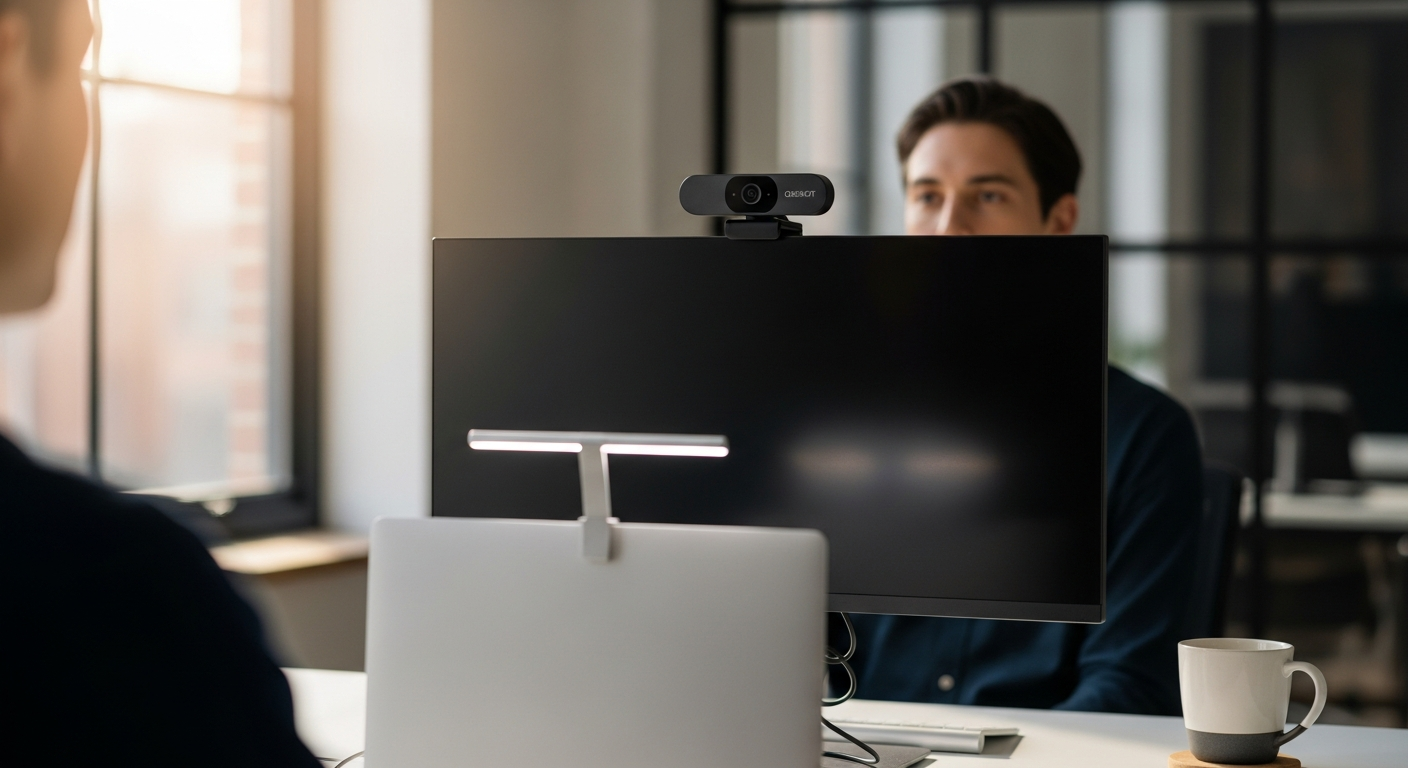
Discover how the OBSBOT Tiny 2 AI 4K webcam transforms remote work with intelligent gesture control and automatic tracking. Perfect for professionals who demand professional-grade video without the complexity. Read our in-depth breakdown.
Remote workers spend more than 6 hours per week in video calls, yet most rely on static, unflattering camera angles that undermine their professional presence. The difference between being perceived as competent and credible versus appearing unprepared often comes down to something as simple as camera framing and video quality. It's a reality that catches many professionals off guard: on-camera presence matters far more than they initially realized.
The OBSBOT Tiny 2 AI 4K webcam represents a fundamental shift in how professionals approach on-camera work. This isn't just another webcam—it's a deliberate investment in how you're perceived during video calls, presentations, and client meetings. It combines AI-powered tracking, gesture recognition, and 4K clarity into a system designed specifically for people who understand that professional video presence carries real consequences.
Explore the OBSBOT Tiny 2 and see how AI-powered webcams are transforming remote work video quality.
Why Remote Workers Are Ditching Static Webcams for AI-Powered Alternatives
The psychology of on-camera presence: how framing and positioning affect professional perception
Framing isn't a minor detail. Neuroscience research on perception shows that people unconsciously assess competence, trustworthiness, and authority based on visual signals. When your camera angle forces you to look down at the lens, it creates a submissive impression. When poor lighting washes out your features, you appear less engaged. When you're positioned awkwardly in the frame, viewers experience cognitive friction—their brains work harder to process what they're seeing, leaving less mental energy for absorbing your actual message.
Static webcams lock you into one position. If you move slightly left or right, you're suddenly off-center. If you stand up during a presentation, your head disappears. These limitations force you to either stay physically constrained or constantly reposition your entire desk setup. The OBSBOT Tiny 2 eliminates this constraint entirely through mechanical pan and tilt, keeping you perfectly framed regardless of your natural movement.
The hidden cost of poor video quality: missed opportunities, reduced credibility, and client relationships
Consider what happens when a client can barely see your face due to grainy video quality. Or when inadequate lighting casts shadows that make you appear tired or disengaged. These technical shortcomings create friction in professional relationships before you've even opened your mouth.
Studies on video communication show that when video quality drops, people perceive the speaker as less trustworthy and less competent. This isn't rational bias—it's cognitive load. Poor video quality forces the viewer's brain to work harder to interpret your facial expressions and body language. That extra effort translates into reduced credibility and engagement. For freelancers, consultants, and salespeople, this effect directly impacts business outcomes. A client meeting conducted over a grainy, poorly framed webcam literally costs you money in the form of reduced perceived value.
The 1/1.5-inch CMOS sensor in the OBSBOT Tiny 2 captures significantly more detail than standard webcams. Colors appear more natural. Low-light performance handles the inconsistent lighting of home offices. Your face looks sharp and professional, not compressed and artificial.
How gimbal-based systems differ fundamentally from fixed webcams
Fixed webcams are static by nature. Once you position them, they can't move. Digital zoom exists in software, but it just crops the image and reduces quality. Gimbal-based systems like the OBSBOT Tiny 2 use motorized mechanical movement to actually reposition the camera in three dimensions.
This distinction matters enormously for dynamic presentations. If you're explaining a concept and naturally gesture, the gimbal tracks your movement and keeps you centered. If you stand up to emphasize a point, the camera smoothly follows. If you move across your office during a walk-and-talk segment, the tracking maintains perfect framing without any manual input from you. This creates a cinematic quality that fixed webcams simply cannot achieve.
Hands-Free Control: Gesture Recognition and Voice Commands That Respond
How gesture control works: hand signals that trigger adjustments without touching your keyboard
The OBSBOT Tiny 2's gesture recognition operates through its companion software and built-in AI processing. Specific hand signals trigger camera functions. Make a "zoom in" gesture with your fingers, and the camera zooms. Point in a direction, and the gimbal pans accordingly. This isn't gimmicky—it's genuinely practical.
Consider a typical scenario: you're in a client call and want to zoom in on a document you're holding. With a traditional setup, you'd need to either reach for your keyboard, interrupt your train of thought, or awkwardly ask the client to wait while you adjust your camera. With gesture control, you simply make the gesture and continue talking. The camera responds in real time.
Voice command integration: which functions respond to voice and accuracy compared to manual controls
Voice commands complement gesture control. You can verbally trigger zoom adjustments, tracking mode changes, and pan/tilt movements. The accuracy is notably higher than early voice control implementations—the OBSBOT Central software has been refined through multiple iterations to recognize commands reliably even in typical office environments.
Practically speaking, voice commands are most useful when your hands are occupied or when you want to maintain unbroken focus on your audience. During a presentation where you're holding notes or gesturing, voice commands allow you to adjust framing without any physical interaction with hardware or software controls.
The practical advantage: maintaining eye contact and natural body language while adjusting framing
This is the true value proposition. Traditional camera adjustments require you to look away from the camera, breaking eye contact with your audience. Even quick adjustments create a disconnect. With hands-free controls, you maintain natural eye contact and body language while the camera adapts to your position.
Psychologically, this matters tremendously. Eye contact signals engagement and confidence. When you can adjust your camera without breaking that connection, your entire on-camera presence improves. You appear more present, more confident, and more professional.
AI Tracking Modes Explained: From Head-and-Shoulders to Hand Gestures
Overview of five distinct tracking modes and when each serves different scenarios
The OBSBOT Tiny 2 offers multiple tracking modes, each optimized for different situations. Head-and-shoulders mode works for traditional video calls. Upper body mode captures more of your torso and gestures. Lower body mode includes your hands and lap for interviews where you're sitting. Hand tracking focuses on detailed close-up work. Beauty mode applies subtle enhancements to your appearance.
This variety means the camera adapts to your actual use case rather than forcing you to adapt to its limitations.
Head and shoulders tracking: ideal for video calls, interviews, and presentations
Head-and-shoulders mode represents the default tracking behavior for most professional scenarios. The AI detects your face and maintains framing that puts your head and shoulders in the optimal position. As you move, the gimbal adjusts smoothly to keep you centered.
For video calls, this means you can naturally shift in your chair, lean forward for emphasis, or adjust your posture without becoming off-center. The framing remains professional and consistent. For interviews, it creates the appearance of a professional camera operator who's actively following your movement—except there's no operator, just intelligent software.
Hand tracking capability: revolutionary for detailed explanations and technical demonstrations
Hand tracking represents the most innovative feature. When activated, the camera focuses on and follows your hands. For professionals who explain concepts visually—designers showing their work, engineers walking through technical diagrams, trainers demonstrating procedures—this capability is genuinely revolutionary.
Imagine conducting a training session where you need to show detailed work on a small screen or document. Hand tracking keeps your hands and the subject matter perfectly framed without any manual adjustment. It's the equivalent of having a camera operator who understands exactly what you're trying to show and frames it accordingly.
The 4K Sensor Advantage: Why a 1/1.5-Inch CMOS Makes a Tangible Difference
Understanding sensor size and its impact on image quality, light sensitivity, and color accuracy
Sensor size is one of the most misunderstood specifications in webcam marketing. Larger sensors capture more light, which translates directly into better image quality, especially in challenging lighting conditions. A 1/1.5-inch sensor is significantly larger than the 1/4-inch sensors found in most budget webcams.
The relationship between sensor size and image quality is nearly linear. A sensor that's three times larger captures roughly three times as much light information. This means sharper details, richer colors, and better performance in low-light conditions. It also means less aggressive noise reduction, which preserves detail instead of smoothing it away into an artificial-looking blur.
The 1/1.5-inch CMOS advantage: comparison to standard sensors
Standard webcams typically use 1/4-inch or smaller sensors. In practical terms, the OBSBOT Tiny 2's 1/1.5-inch sensor captures video that looks noticeably cleaner, sharper, and more professional. Colors don't look over-saturated or artificially enhanced. Skin tones appear natural. Background detail remains visible even when it's slightly out of focus.
This matters for your professional image. When a colleague or client sees you on video, they're subconsciously processing the technical quality of the feed. Lower quality creates a subtle impression of lower professionalism, even if they can't consciously identify why. Higher quality creates the opposite effect—you look more polished, more credible, more professional.
Low-light performance: why this camera excels in home offices with variable lighting
Home offices rarely have optimal lighting. You might have a window that creates harsh shadows during certain hours. Overhead lighting might be fluorescent, which creates an unflattering color cast. Desk lighting might be inadequate. The OBSBOT Tiny 2's larger sensor handles all these scenarios better than standard webcams.
The All-Pixel Auto Focus technology combines with the sensor advantage to maintain sharp focus even when lighting is inconsistent. You don't need to invest in professional lighting rigs or ring lights to look good on camera. The camera itself compensates for imperfect lighting conditions.
Mechanical Pan and Tilt: The Gimbal System That Sets It Apart
How mechanical movement differs from digital zoom or software-based framing
Digital zoom crops your existing video, reducing resolution and image quality. Software-based framing adjusts what's visible in your feed but doesn't actually change what the camera is pointing at. Mechanical movement physically repositions the camera.
This distinction creates vastly different user experiences. With mechanical movement, you can reposition to show different parts of your office, shift your framing to emphasize different aspects of your presentation, or adjust for dynamic movement—all without any loss of video quality or resolution. The camera is actually pointing at new territory, not just showing you a cropped version of what it always sees.
Range of motion: what 360-degree pan and tilt capability enables
The OBSBOT Tiny 2 provides 360-degree horizontal pan and substantial vertical tilt. This range means you can point the camera in virtually any direction without repositioning your desk or equipment. Need to show something off to your side? The camera pans. Need to show your desk surface? The camera tilts down. Need to create a dynamic transition shot? The camera moves fluidly through the transition.
For content creators, this range is powerful. You can shoot multiple angles from a single desk position. For remote workers, it means you can adapt your camera to different scenarios without physical reconfiguration.
Motorized precision: smooth, jerk-free movements that look professional
The gimbal mechanics are carefully engineered to move smoothly. Tracking adjustments don't jerk or stutter. Pan and tilt movements flow naturally. This smoothness is essential for professional video because jerky camera movements create visual noise that's distracting and unprofessional.
The motors are also quiet. You won't hear mechanical grinding during video calls. The movement is as unobtrusive as a professional camera operator would be—present but invisible.
Pricing and Value Proposition: Standard vs. Lite Model
OBSBOT Tiny 2 standard edition at $329: what justifies the premium
At $329, the OBSBOT Tiny 2 costs roughly 10 times more than a basic webcam and 3-5 times more than a quality mid-range alternative. This premium reflects the engineering complexity and component quality. The motorized gimbal system alone requires precision manufacturing. The 1/1.5-inch CMOS sensor represents a significant component cost. The AI processing and gesture recognition software required substantial development investment.
The justification is that this investment directly improves your professional video presence. If your work depends on video communication, the ROI becomes measurable. A client you win through better video presence, a salary negotiation where you appear more confident and competent on camera, a course you sell because your production quality is noticeably superior—these outcomes can easily exceed $329.
OBSBOT Tiny 2 Lite at $180-$199: feature differences and considerations
The Lite version maintains most core features: the gimbal system, gesture control, voice commands, and most tracking modes. The primary differences involve visual clarity and color accuracy. Some reviews suggest the Lite version has slightly less refined color reproduction and potentially slightly less impressive low-light performance.
For professionals on tighter budgets, the Lite version represents a reasonable compromise. You still get the differentiation of AI tracking and mechanical gimbal positioning. You're trading some sensor refinement for significant cost savings.
Cost comparison to competitors: Insta360 Link, Razer Kiyo Pro Ultra, and alternatives
The Insta360 Link offers comparable AI tracking and sits in a similar price range. The Razer Kiyo Pro Ultra emphasizes high frame rates and has a larger sensor but lacks the gimbal movement. Mid-range webcams like the Logitech Brio 4K cost less but lack AI tracking and gimbal movement entirely.
The OBSBOT Tiny 2 occupies a specific niche: premium video quality plus active framing through gimbal movement plus AI tracking. If you value all three capabilities, it's competitive. If you prioritize only video quality or only tracking, competitors might offer better value.
Who Should Actually Buy the OBSBOT Tiny 2
Ideal candidates: remote workers in client-facing roles, content creators, educators, and freelancers
Sales professionals, consultants, and freelancers whose video presence directly influences business outcomes represent the primary audience. These professionals have a direct financial incentive to look professional on camera. The investment pays for itself through improved client perception and outcomes.
Content creators—streamers, YouTube educators, podcasters with video elements—benefit from the production quality and automated framing capabilities. The camera essentially provides a personal cameraman who continuously adjusts framing for optimal presentation.
Educators conducting online instruction or corporate trainers delivering virtual training benefit significantly. The hand tracking mode particularly serves this group, allowing detailed demonstrations without manual camera adjustments.
Might want to reconsider: minimal video call requirements and budget constraints
If your job involves occasional video calls in a static role, the OBSBOT Tiny 2 represents overkill. A quality mid-range webcam serves this use case adequately. The premium features go underutilized.
Budget-conscious buyers who don't have a specific professional need for video quality should consider alternatives. The OBSBOT Tiny 2 Lite or even mid-range options provide adequate video quality for casual professional use.
Workers in perfectly lit, stationary environments with minimal on-camera activity may not see tangible value from the gimbal system or sensor advantages. The features only matter if you actually use them.
The OBSBOT Tiny 2 Lite alternative: when $150 savings justifies limitations
If you want the gimbal system and AI tracking but are budget-conscious, the Lite version saves $150 while maintaining the core feature set. This represents an appropriate choice for professionals whose video presence matters but who are willing to trade some color fidelity for cost savings.
Consider the Lite version if you're primarily in video calls rather than creating recorded content. Live video call compression minimizes the visual differences between standard and Lite models. If you're recording content for distribution, the standard model's sensor advantage becomes more apparent.
The Verdict: Is Professional Video Worth the Investment?
The OBSBOT Tiny 2 AI 4K webcam isn't designed for everyone—and that's precisely what makes it valuable. If your professional life includes video calls, presentations, or content creation where your on-camera appearance directly influences how clients, colleagues, or audiences perceive your competence and credibility, this camera delivers measurable value that justifies its premium price.
The hands-free gesture control eliminates the friction of manual adjustments. The intelligent AI tracking keeps you perfectly framed without conscious effort. The superior 4K sensor compensates for imperfect home office lighting and captures details that standard webcams miss. Together, these capabilities create something genuinely rare: a camera system that actively works to make you look better and more professional without requiring you to think about it.
The real value proposition extends beyond technical specifications. This camera handles the technical complexity of professional video presentation, freeing you to focus on your actual message. You show up on screen with smoother framing, better lighting compensation, and the quiet confidence that comes from knowing your technical setup matches your professional standards.
The question worth asking yourself: does your professional life demand video presence excellent enough to justify the cost? For salespeople whose calls determine outcomes, consultants whose credibility influences decision-making, content creators competing in crowded markets, and educators whose production quality affects student engagement, the answer is almost certainly yes.
Invest in the OBSBOT Tiny 2 and transform how you present yourself on camera.